Help & guidance
Learn any page or term. Hover the ⓘ icons around the app for quick hints, or take a guided tour.
Getting started
The sidebar groups the app into everyday viewing pages (Compete, Analyse, Drivers) and, for admins, the setup and race-control areas below the divider.
New here? Use “Take a tour” at the top of this panel for a guided walkthrough tailored to your role, and hover any ⓘ icon to learn what a term or control means.
Welcome flow and getting-started checklist
The first time you join a league, a short Welcome sets you up: Welcome, You, Card, Stay informed, Telemetry and Go. Steps that do not apply to you are left out, every step can be skipped, and “Skip setup” ends it. Closing it only puts it away; it resumes at the first step you have not finished. Members who already took the tour never see it unprompted.
The Getting started card on your dashboard lists only what your league uses, and each item ticks itself off when you have really done it, not when you click. If an item needs a linked driver, it tells you to ask your admin. “Dismiss” hides the card.
To bring them back, open the Help panel (?) and choose “Show the welcome again” or “Show the getting-started checklist”. The guided tour is the last step of the welcome, and “Take a tour” in the Help panel starts it any time.
Customising your driver card
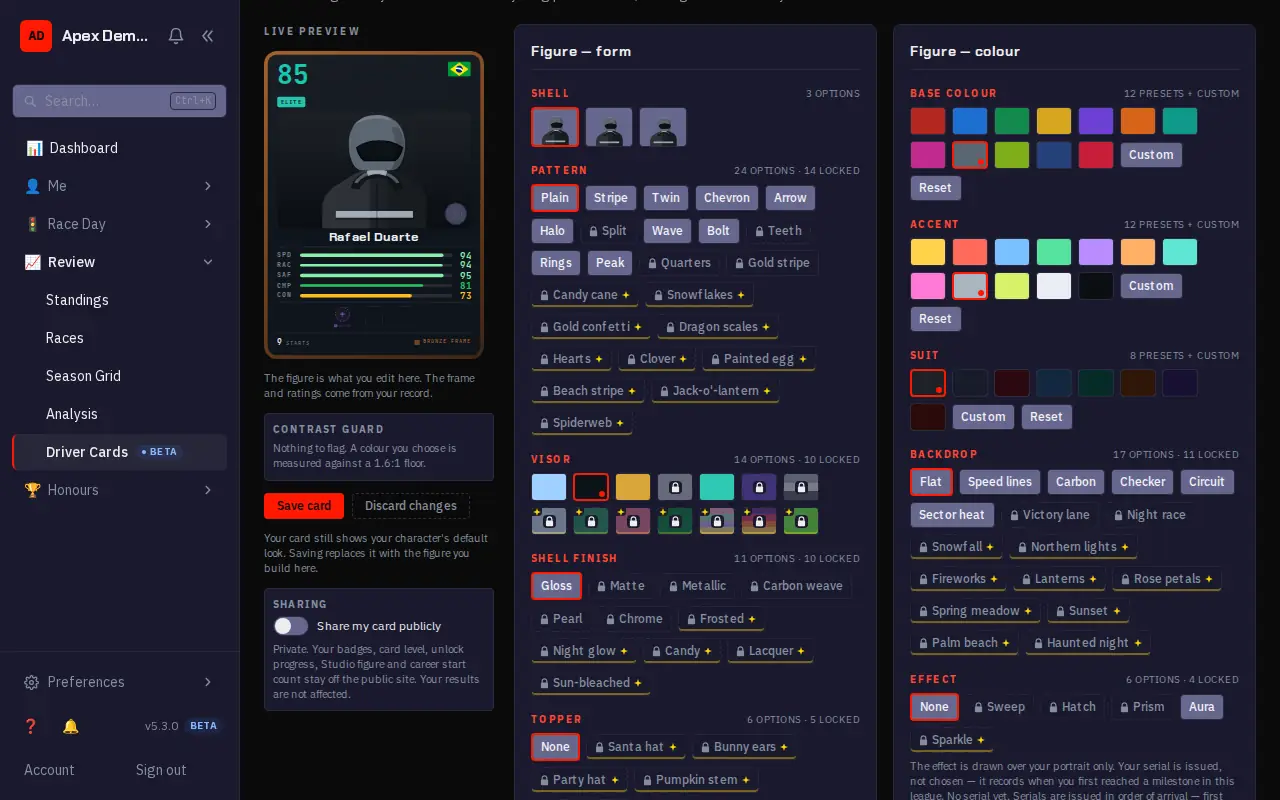
Card Studio (Driver Cards, or Customise on your profile) is where you build the figure on your driver card: its shell, pattern, colours, backdrop and effect. Everything previews live, and nothing is stored until you save. The frame, nameplate and title are earned through your career; a lock marks an option you have not unlocked yet.
Screenshots from a demo league with invented drivers. Your own pages show your league.
Step 1 of 5: The live preview is your card as others will see it. Every change shows here first.
Your driver page
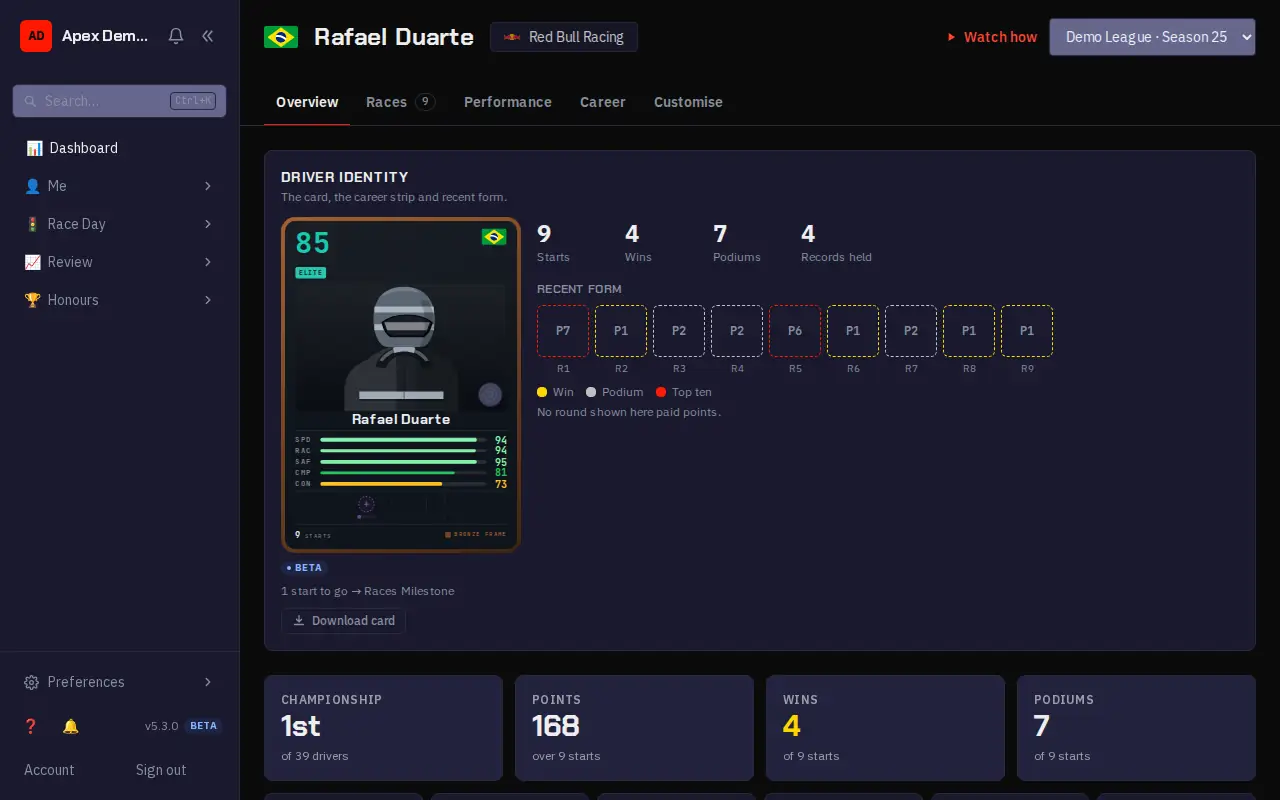
Every driver has a profile: the driver card and recent form at the top, the season's numbers (championship position, points, wins, podiums, penalty points) below, and tabs for your races, your ratings (Performance) and your long-term record (Career). The season picker looks back at earlier seasons.
Screenshots from a demo league with invented drivers. Your own pages show your league.
Step 1 of 5: Your card, your career numbers and your recent form: one box per round, marked for wins, podiums and top tens.
My racing
If you race in more than one league, My racing (in the Me section of the sidebar) is your one page for all of them: your counts, your upcoming sessions with overlaps between leagues marked, what needs you now (you can check in or withdraw right there) and your latest results. It is in Beta.
Wins, podiums and races are added up across leagues, but points and ratings never are, because every league has its own ladder; those stay on each league's card. The page covers up to 10 leagues, and your applications stay on their own page.
Reading a race's telemetry
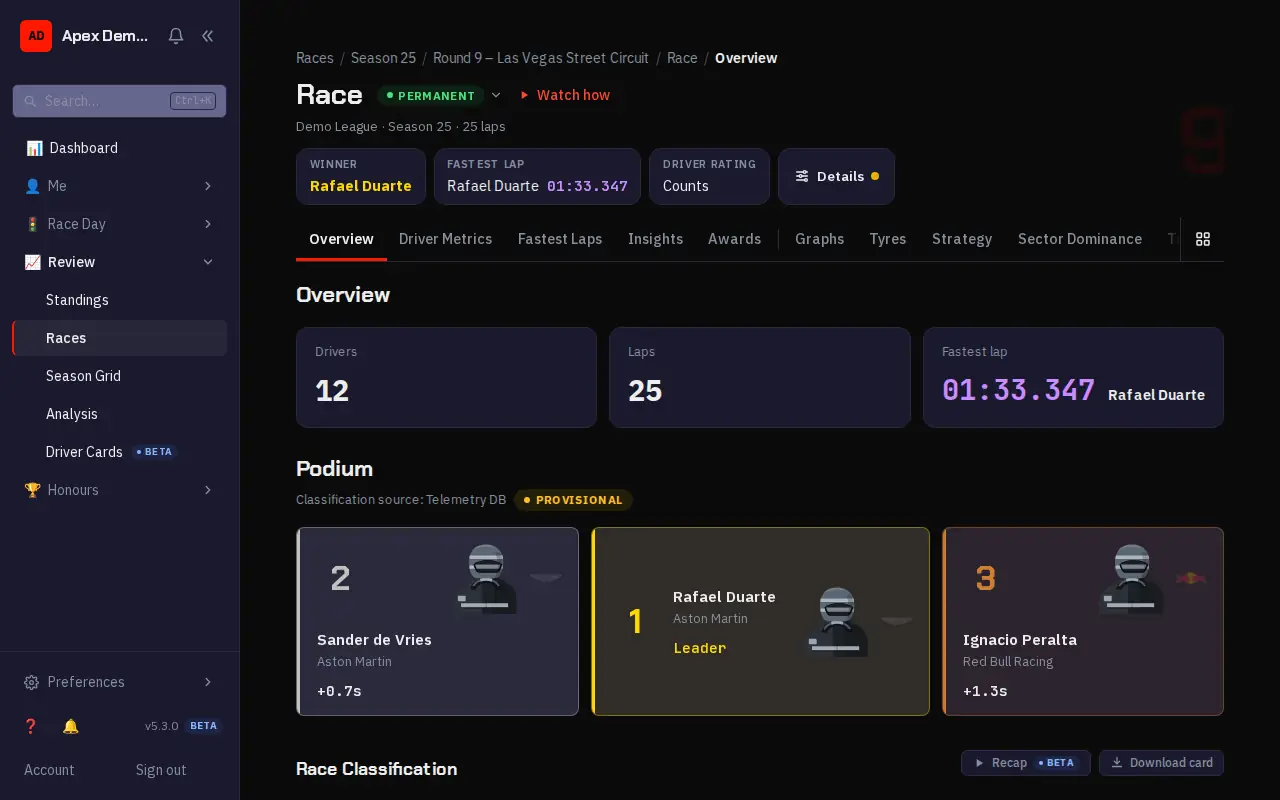
Open any round from Races to see its telemetry. The tabs split the session into views: the overview and classification, graphs that compare drivers lap by lap, tyres and strategy, sector dominance on the track map, and a replay of the race. Results here are provisional until the stewards finish; the standings use the final result.
Screenshots from a demo league with invented drivers. Your own pages show your league.
Step 1 of 5: Each race page splits the session into tabs: overview, driver metrics, fastest laps, graphs, tyres, strategy and more.
Standings vs. provisional results
Championship standings are built from final, post-penalty results. They deliberately exclude the provisional order generated straight from telemetry.
So a race page may show a provisional classification that later changes once stewards apply penalties and an admin makes the result permanent — the standings only ever reflect that permanent result.
Standings and league stats
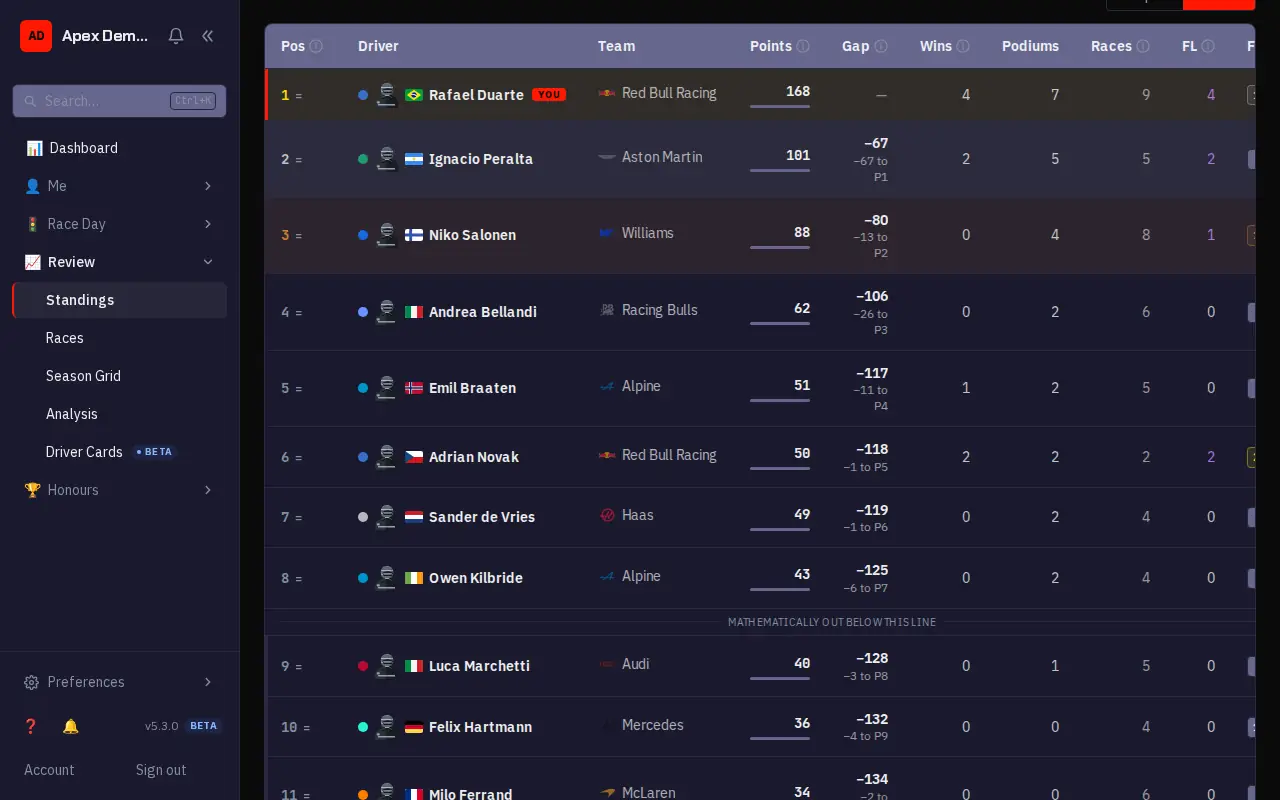
Beyond the race pages, the league keeps running statistics: the championship standings, track records, season sector dominance, circuit tyre strategy and qualifying history. Standings and the Analysis pages are under Review; track records are under Honours.
Screenshots from a demo league with invented drivers. Your own pages show your league.
Step 1 of 5: The standings rank the championship. Your row is marked, with gaps, wins, podiums and form.
Driver ratings (OVR / SPD / RAC / SAF / CMP / CON)
OVR is the headline rating, shown on a roughly 60–99 scale. It's built from three sub-scores computed from race telemetry — Speed (SPD), how fast your representative laps were; Racecraft (RAC), what you did wheel-to-wheel; and Competence (CMP), how cleanly you executed the race, from your green-flag lap consistency and how your pace held up against the field's. Consistency (CON) affects how quickly the rating reacts to new results, and Safety (SAF) is fully computed and shown but doesn't currently feed into it. All five components are shown on that same ~60–99 scale.
Ratings and per-race history live on each driver's profile. The leaderboard ranks drivers across the league.
Penalty points
Penalty points are licence-style points recorded against a driver for on-track incidents, shown on the driver profile. They are separate from championship points and don't change the standings directly.
Protests
If you raced in a session, you can file a protest about an on-track incident from its race page, for as long as the result is still provisional. Stewards review it and the outcome may become a penalty. Once the session is finalized, protests for it are closed. Track the status of protests you filed on “My Protests”. A league may also set a shorter filing window after the session ends; if it does, the report button shows a countdown until protests close.
Glossary
- Provisional results
- When a race is uploaded the app generates a provisional finishing order straight from the telemetry. Stewards may then apply penalties (time, points, or disqualification) and recompute. Provisional results are not the final word — they become final only when an admin explicitly makes them permanent.
- Final results
- Final results are the classified order after all penalties have been applied and an admin has made them permanent. Championship standings are built from final results, not from the provisional telemetry order.
- Standings
- Standings aggregate championship points from each round's final results. They deliberately exclude provisional, pre-penalty telemetry order so the table only ever reflects classified, permanent results.
- Penalty
- A penalty is a steward's ruling applied to a driver in a session: added race time, a grid-position drop, a points deduction, or disqualification (DSQ). Applying or editing a penalty recomputes the affected results.
- Penalty points
- Penalty points are licence-style points recorded against a driver for on-track incidents, tracked on the driver profile. They are separate from championship points and do not change the standings directly.
- Protest
- If you raced in a session, you can file a protest about an on-track incident from its race page — for as long as the result is still provisional. Stewards review it, and the outcome may become a penalty. Once the session is finalized, protests for it are closed. You can track the status of protests you filed on “My Protests”. A league may also set a shorter filing window after the session ends; if it does, the report button shows a countdown until protests close.
- Anomaly flag
- Anomaly detection flags telemetry that looks unusual (implausible speeds, corner-cutting patterns, etc.). Flags are advisory: they surface things worth a steward's attention and are never an automatic penalty or a final determination.
- OVR (Overall rating)
- OVR is the headline driver rating, shown on a roughly 60–99 scale. It's a field-relative rating built from Speed, Racecraft and Competence — not a simple average of the five components shown below it — and Consistency affects how quickly it reacts to new results. Safety is fully computed and displayed on its own, but doesn't currently feed into Overall, so a high Safety score next to a lower Overall isn't a data error. "Field-relative" above is the load-bearing word, and it bounds what OVR can be compared with: every race is scored only against the grid that actually ran it, so two tiers that never meet each settle around the same baseline independently. Absolute pace barely shows up — two fields with identical skill spread but 4.0s a lap between them produced a best-driver OVR gap of 0.05. A driver who dominates the slowest tier and one who dominates the fastest therefore read almost the same, and the number should not be used to rank one tier against another.
- SPD (Speed)
- Raw pace — how fast the driver's representative lap times are.
- RAC (Racecraft)
- Wheel-to-wheel skill — overtaking, defending and position gained.
- SAF (Safety)
- Clean-driving score — fewer incidents, collisions and penalties raise it.
- CMP (Competence)
- Competence measures race execution, not raw speed. Half of it is lap consistency: how tightly your representative green-flag laps cluster together, with pit, safety-car and traffic laps filtered out. The other half is pace retention — whether your lap times held up over the race compared with how the rest of the field's moved that day, so managing tyres and fuel to hold your pace while others fade scores well. It is deliberately independent of Speed, which measures how fast you were rather than how well you executed: a quick driver can have a modest Competence, and a steady midfielder a high one.
- CON (Consistency)
- How consistent this driver's race results are, round to round — steadier performances score higher and make the driver's Overall rating respond faster to new results; volatile results are weighted more cautiously.
- Tier
- Tiers are skill divisions inside a league (e.g. Pro / Am). Drivers are assigned to a tier, and races, results and standings are organised per tier.
- Weekend type
- A weekend type defines the sessions that make up a race weekend and their order, so each round on the calendar can reuse a consistent structure.
- Format
- A format captures how a round is run and scored — the session layout and any special rules such as sprint or reverse-grid — so rounds can share a consistent shape.
- Point system
- A point system maps finishing positions to championship points, including any bonuses (e.g. fastest lap, pole). Each season/format references a point system to score its results.
- Pace band
- A signpost from fastest to slowest, built from classified green-flag lap times — never a driver rating: it says how quick a tier's racing is, not how good the league is. A slower-band league with a happy, reliable field can be a better league to join than a faster one that folds. Bands stay dark until an operator publishes them from a real distribution; until then they read as unavailable everywhere.
- Roles & permissions
- Access is permission-based. A role bundles permission keys (league.manage, stewarding.manage, members.manage, roles.manage, billing.manage, activity.view). Built-in roles can't be edited; custom roles let you tailor access per league.
- Activity log
- The activity log records every privileged change (penalties, results, member/role changes, settings) with a snapshot of who made it. It's per-tenant, retention-bounded, and viewable by admins with the activity.view permission.
- Plan-locked feature
- A lock badge means the feature isn't part of your league's current plan. It stays visible so you can see what's available; upgrading the plan unlocks it. Access is otherwise unchanged.
- Driver of the Day
- Driver of the Day recognises a standout performance each race weekend. There is one poll per event and it runs on the feature race, so a sprint weekend still has a single vote. Depending on the league it's decided by member votes or an automated tally over the session.
- Data retention & export
- Retention controls how long uploaded telemetry and derived data are kept. The Data & Export tools let an admin export a league's data. Retention windows depend on the plan.
Looking for setup or operator docs? Your account has your profile; the full operator documentation lives in the repository.